By end of part 2 the Design Review Assistant had evolved into a FastAPI service. It could accept a design document, return a structured JSON response, stream results using Server-Sent Events, and expose useful metadata such as latency, token usage, and cost.
The reviews worked well but they were generic. For example, given the following design, the model produced this reliability finding:
{
    "category": "reliability",
    "priority": "critical",
    "summary": "Absence of retries, dead-letter queue, and idempotency increases the risk of message loss."
}
The model is using its general knowledge of distributed systems. Every organization has its own architecture standards, preferred patterns, existing libraries, and operational playbooks and we would want the assistant to review the design agains these internal practices.
We will fixes that with RAG (Retrieval-Augmented Generation): we give the LLM your internal engineering guidance at review time, so findings reflect your standards, not just general knowledge.
The problem:
Imagine a new engineer submits this design doc:
Order Service Design
- REST API for order creation
- PostgreSQL as source of truth
- Publishes OrderCreated to Kafka
- No retry strategy
- No dead-letter queue
- No idempotency key
- No monitoring described
A plain LLM review might flag “missing retry strategy” and “add monitoring.” Useful, but vague.
Lets assume my team already have the guidance docs like this:
retry_strategy.md— outbox pattern, exponential backoff, DLQ routingarchitecture_best_practices.md— OrderCreated checklist, schema versioningapi_guidelines.md— idempotency keys, timeout policiesobservability.md— metrics, alerting, consumer lag
The model can be instructed to review the doc against these guidance.
The question: How do we automatically provide only the relevant parts of those documents for each design review?
That’s what RAG does.
What is RAG?
RAG stands for Retrieval-Augmented Generation.
Retrieve relevant context → Augment the prompt → Generate the answer
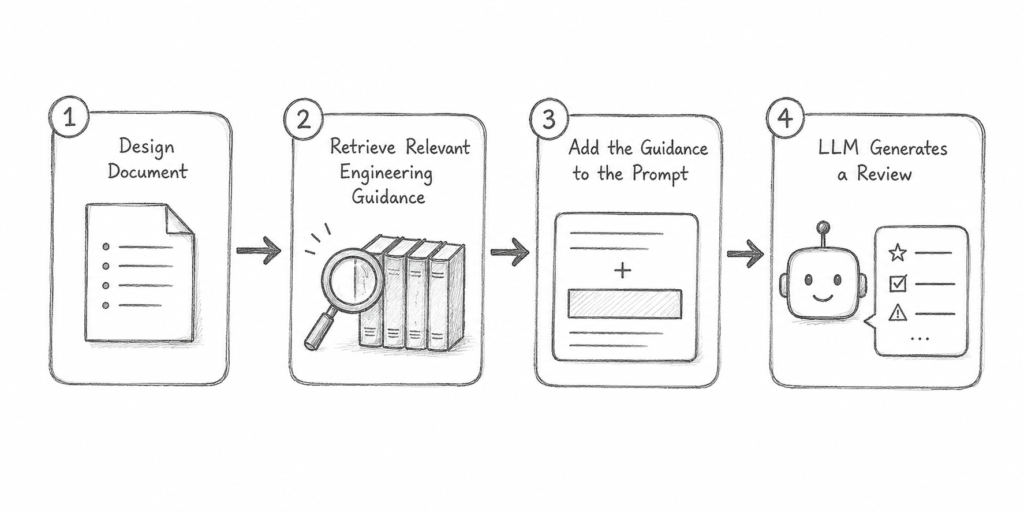
Without RAG, the model only knows what’s in its training. With RAG, it sees my team’s engineering guidance and provide recommendations specific to my environment.
Building the knowledge Base
Next is how do we store them for easy retrieval of relevant content.
The first step is chunking.
Chunking is the processing splitting the large files into smaller pieces before storing them. If we store the entire document as a single chunk, it would mix the context together. Retrieval would likely returns entire file data when all the data might not be relevant. That wastes prompt tokens and introduces unnecessary context.
Chunking would help keep the retrieval precise as each chunk can focus on a single idea.
For this project, I built an EmbeddingService responsible for indexing the knowledge base. It processes each Markdown document by:
- Splitting the document into sections using Markdown headings (
##) as natural boundaries. - Further splitting large sections if they exceed roughly 800 characters.
- Generating an embedding for each chunk.
- Storing both the chunk and its embedding in the vector store.
What are embeddings?
An embedding is simply a numerical representation of the meaning of a piece of text.
For example,
"Use the outbox pattern when publishing Kafka events."becomes something like
[0.018, -0.241, 0.337, ...]The numbers themselves aren’t important.
What matters is that chunks discussing similar concepts such as retries, message delivery, or Kafka publishing end up close to one another in vector space. This makes it possible to search by meaning rather than by exact keyword matches.
I created a python script which embed the knowledge based file
python scripts/index_documents.pywhich uses the EmdeddingService to store the data in the vector store and the chunks.
Retrieving relevant guidance
When the /review API is called with retrieval enabled, the application now performs an additional step before sending the design to the LLM. The Retriever sends the submitted design document to the EmbeddingService, which generates an embedding for the design.
That query embedding is compared with the embeddings already stored in the vector store. The application then selects the five chunks with the highest semantic similarity scores.
Those chunks are then added to the prompt along with the original design document.
Adding citations
I also updated the structured response so that findings can include citations.
A finding can now look like this:
{
  "category": "reliability",
  "priority": "critical",
  "summary": "The design does not describe an outbox pattern to maintain consistency between the PostgreSQL transaction and Kafka publishing.",
  "citations": [
    {
      "source_file": "retry_strategy.md",
      "title": "Message Publishing",
      "chunk_number": 2
    }
  ]
}
This gives the reviewer visibility into which internal guidance was supplied to the model for that finding.
Conclusion
The biggest takeaway for me this week was realizing that retrieval is just another part of the application architecture. The quality of the review now depends not only on the prompt or the model, but also on how documents are chunked, indexed, and retrieved.
At this point, the assistant can review a design using my team’s engineering guidance instead of relying solely on general software engineering knowledge.
In the next part, I’ll build on this foundation by allowing users to upload their own design documents and knowledge bases, making the assistant work with project-specific context.
Build notes
Development tools
- ChatGPT – Helped me create a weekly learning plan, explain concepts
- Cursor – Used as my coding assistant while implementing the project as a pair programmer.
Github Repo